Showing posts with label absolute photometry. Show all posts

Wednesday, May 27, 2015

IES syntax coloring, keyword content assist in EulumdatTools 0.14.6.v20160115

A new version of EulumdatTools 0.14.6.v20160115 was published on January 15 at http://www.fold1.com/eulumdattools/.

Improvements 0.14.6

  • Improved IES syntax coloring, now also indicating periods as field separators
Replace productcode with
  • Added a QuickFix for missing item code in standard version and duplicate item code in sandbox version for EULUMDAT files. You can fill in product code from filename or product name.

Improvements 0.14.5

  • Code quality improvements

Improvements 0.14.4
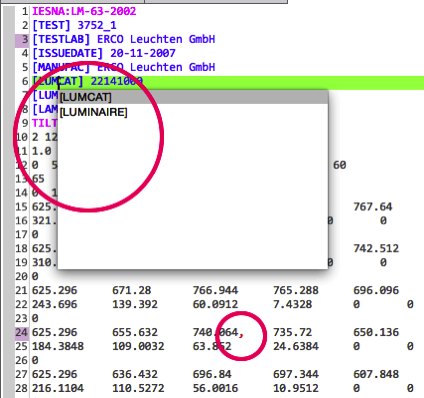
Ies syntax color content assist
  • IES file keywords now have content assist, activated on CTRL+SPACE on Windows/Linux and CMD+SPACE on Mac
  • IES files now have syntax coloring, with illegal characters immediately showing up in RED!
  • Fixed issue with hard coded expiry date

Improvements 0.14.3

  • All versions of EulumdatTools are now based on Eclipse 4.5.1 Mars. To upgrade reinstall from the download site listed below. The Mac version now looks like a regular Mac application.
  • Make it possible to retain Testlab and Testdate/Issuedate on conversion of IES to EULUMDAT and vice versa.Testlab and date keep Based on a suggestion/request by Mikulas Parma.
  • Allow setting of Test Lab name when there is a full license, to be used in conversions.Testlab name pref
  • Removed some annoying behavior where latest blog post opened in external browser

Improvements 0.14.2

  • Fixed nasty conversion bug where IES to EULUMDAT conversion for IES files with absolute photometry had wrong DFF factors calculated. These can be caught and fixed by the Eulumdat validator, but now they are calculated correctly in the first place. If you have converted IES files to EULUMDAT with absolute photometry in the past and not validated the output, please reconvert your files!
  • NOTE: the same bug affected the online IES to EULUMDAT converter at http://ies2eulumdat.appspot.com, so if you have used that, reconvert also!

Improvements 0.14.1

  • A regression causing the IES validator to stop working was fixed (IES Validator Feature)

Improvements 0.14.0

  • Checking your license will now use the https: protocol instead of http: increasing your privacy
  • Open Editors will now return to opened tab between sessions
  • A problem where the cursor moved to start of line in the source editors when installed in Eclipse e4 was fixed
  • You can read this blog right in EulumdatTools so you will always be up to date on latest developments
  • EulumdatTools now contains a structured compare editor to make comparing 2 EULUMDAT files easier (see image) (Sandbox Feature)
  • A check for overlapping C-planes, where there are C-planes for both 0° and 360° was added (Sandbox Feature)

Availability

Registered users should update using Help / Check for Updates... and install the needed features following the steps below, new users should install EulumdatTools first. New users can download an apply for 30 day free evaluation license at the installation site

Installation of EulumdatTools

For use in Eclipse you can use the standard Eclipse update site For stand alone RCP versions of EulumdatTools choose your platform and perform update after installation.:

Installation of Sandbox Feature

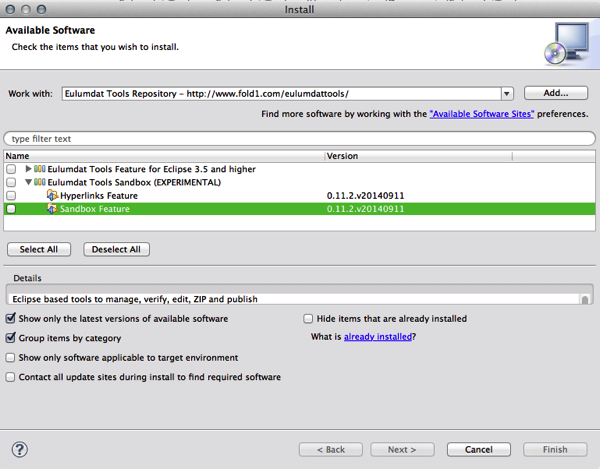
Select menu Help / Install New Software... and choose the Eulumdat Tools Sandbox / Sandbox Feature, press Next and follow through with the installation. Also see here

Tuesday, October 28, 2014

Improved IES-EULUMDAT conversion in EulumdatTools 0.13.1.v20141027

A new version of EulumdatTools 0.13.1.v20141027 was published on October 27 at http://www.fold1.com/eulumdattools/.

IES to EULUMDAT and EULUMDAT to IES conversion was improved:

  • There was an error in conversion of files with absolute photometry, IES files signal this by having a -1 for lumens per lamp, EULUMDAT files signal this by have a negative number of lamps. The conversion now works correctly.
  • As the lighting industry is moving over to SSD lighting at tremendous speed, with resulting lower energy consumption, I found that the old rounding of wattage and power consumption are making conversion inaccurate. The number of decimal places for power consumption and wattages was increased to 2.

Availability

Registered users should install this feature following the steps below, new users should install EulumdatTools first. New users can download an apply for 30 day free evaluation license at the installation site

Installation of EulumdatTools

For use in Eclipse you can use the standard Eclipse update site For stand alone RCP versions of EulumdatTools choose your platform and perform update after installation.:

Installation of Sandbox Feature

Select menu Help / Install New Software... and choose the Eulumdat Tools Sandbox / Sandbox Feature, press Next

Install sandbox feature

Press Next

Install sandbox feature 2

Accept the license

Accept license

Accept and Trust my certificates to install this feature

Accept certificate

Monday, March 25, 2013

New version of EulumdatTools 0.9.17.v20130325 released

A new version of EulumdatTools 0.9.17.v20130325 was published on March 25 at http://www.fold1.com/eulumdattools/. Improvements and bug fixes for 0.9.14.v20130204 are as follows:
  • Improved code quality metrics.
  • Add check for zero lamp lumens in IES reader code.
  • The version number was updated to 0.9.14.
Improvements and bug fixes for 0.9.15.v20130209 are as follows:
  • Improved handling of Eulumdat files with absolute photometry.
  • Make it easier to find place to enter license code once registered.
  • The version number was updated to 0.9.15.
Improvements and bug fixes for 0.9.16.v20130222 are as follows:
  • Made sequence of properties in Project Explorer and Product Properties view the same.
  • Automated build.
  • First version of optional IES validator (install separately).
  • Improved stability on very large file sets (5000+ files).
  • The version number was updated to 0.9.16.
Improvements and bug fixes for 0.9.17.v20130325 are as follows:
  • Make C angles for C-Gamma page in editor display angles from 90° - 270° instead of 270° - 0°.
  • Add consistency check for gamma 0 for all C-planes (nadir).
  • Improved stability even more on very large file sets (5000+ files).
  • Fixed problem with updating for new releases.
  • Improved version of optional IES validator (install separately).
  • The version number was updated to 0.9.17.

Registered users should not upgrade using Check for upgrades but download a complete new version and register that using their existing license keys. The problem with updating was fixed, so this should be the last time. New users can download an apply for 30 day free evaluation license at the installation site

Installation

For use in Eclipse you can use the standard Eclipse update site For stand alone RCP versions of EulumdatTools choose your platform and perform update after installation.:

Friday, June 15, 2012

New version of EulumdatTools 0.9.9.v20120615 released

A new version of EulumdatTools 0.9.9.v20120615 was published on June 15th at http://www.fold1.com/eulumdattools/. We fixed a bug with the conversion of absolute photometry IES to EULUMDAT where the LOR was calculated incorrectly. This conversion utility is also available free of charge at ies2eulumdat.appspot.com. Apply for 30 day free evaluation license at the installation site

Installation

For use in Eclipse you can use the standard Eclipse update site For stand alone RCP versions of EulumdatTools choose your platform and perform update after installation.:

Friday, April 16, 2010

New version 0.6.6.v20100416 released

Today I released a new version of Eulumdat Tools. It is available as Eclipse plugin or standalone RCP application for Windows XP, Windows Vista/7.0, Mac OSX 10.5 and Mac OSX 10.6 64 bit.

Preliminary support for Absolute Photometry in EULUMDAT files

Since August 2009 the EULUMDAT standard was modified to allow Absolute Photometry as described here. The new rules boil down to the following changes:
  • Only one lampset is allowed
  • LORL is set to 100%
  • The number of lamps (line 26a) is set to a negative number

IES files with Absolute Photometry translate to the new format EULUMDAT files

Many LED light sources have photometric data provided as IES files. Eulumdat Tools allows easy conversion fo such files for use with softare such as Relux or Dialux.
EulumdatTools will also help manufacturers and importers of new energy saving light sources such as LED's to provide accurate and consistent photometric data.

Numerous smaller bugs in correctly displaying grahics for these lamps were also fixed


Thanks to Fanis Kavouropoulos and Linuz Backelin for helping track down and reporting these problems!