Showing posts with label photometric files. Show all posts

Wednesday, August 16, 2017

New Version of EULUMDAT TOOLS

New version checks for UTF-8 BOM headers

When editing IES files with modern text editors, sometimes an UTF-8 BOM header is places before the actual text. This will mess up reading the file in most photometric tols and prevent conversion in EulumdatTools.

Due to a build error you cannot update. Please install the whole application again from links below. Apologies!

Main improvements are for improved conversion of EULUMDAT to IES for later use in AGI32 Simulation tool. When nadir or zenith is not identical in all planes, the error result is unable to load file: nadir values not equal. When processing files as EULUMDAT or LDT you can check for many common errors and get help in correcting these.

Improvements in this release

Runtime updated to Eclipse 4.7 Ogygen

The underlying workbench has been updated to the latest version of Eclipse, 4.7 or Oxygen. This means improvements in speed and stability and other. More information an be found here

Improvements in EulumdatTools 0.14.7 itself

  • Improved the check for different values at gamma 0 (nadir). Comparison is now to the average value for all C-planes
  • Added check for different values at gamma 180 (zenith). Also comparing to average value.
  • Added QuickFixes for these two checks, so you can replace all different nadir and zenith values with the average for multiple files.
  • The Sandbox feature is included by default.
  • Extended the default expiry date to 2018, so no sudden stops this year ;-)

Prior release improvements

Improvements 0.14.6

  • Improved IES syntax coloring, now also indicating periods as field separators
Replace productcode with
  • Added a QuickFix for missing item code in standard version and duplicate item code in sandbox version for EULUMDAT files. You can fill in product code from filename or product name.

Improvements 0.14.5

  • Code quality improvements

Improvements 0.14.4
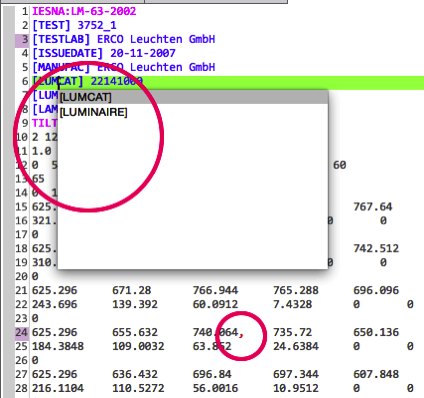
Ies syntax color content assist
  • IES file keywords now have content assist, activated on CTRL+SPACE on Windows/Linux and CMD+SPACE on Mac
  • IES files now have syntax coloring, with illegal characters immediately showing up in RED!
  • Fixed issue with hard coded expiry date

Improvements 0.14.3

  • All versions of EulumdatTools are now based on Eclipse 4.5.1 Mars. To upgrade reinstall from the download site listed below. The Mac version now looks like a regular Mac application.
  • Make it possible to retain Testlab and Testdate/Issuedate on conversion of IES to EULUMDAT and vice versa.Testlab and date keep Based on a suggestion/request by Mikulas Parma.
  • Allow setting of Test Lab name when there is a full license, to be used in conversions.Testlab name pref
  • Removed some annoying behavior where latest blog post opened in external browser

Improvements 0.14.2

  • Fixed nasty conversion bug where IES to EULUMDAT conversion for IES files with absolute photometry had wrong DFF factors calculated. These can be caught and fixed by the Eulumdat validator, but now they are calculated correctly in the first place. If you have converted IES files to EULUMDAT with absolute photometry in the past and not validated the output, please reconvert your files!
  • NOTE: the same bug affected the online IES to EULUMDAT converter at https://ies2eulumdat.appspot.com, so if you have used that, reconvert also!

Improvements 0.14.1

  • A regression causing the IES validator to stop working was fixed (IES Validator Feature)

Improvements 0.14.0

  • Checking your license will now use the https: protocol instead of https: increasing your privacy
  • Open Editors will now return to opened tab between sessions
  • A problem where the cursor moved to start of line in the source editors when installed in Eclipse e4 was fixed
  • You can read this blog right in EulumdatTools so you will always be up to date on latest developments
  • EulumdatTools now contains a structured compare editor to make comparing 2 EULUMDAT files easier (see image) (Sandbox Feature)
  • A check for overlapping C-planes, where there are C-planes for both 0° and 360° was added (Sandbox Feature)

Availability

Registered users and new users should download the new version. New users can apply for 30 day free evaluation license at the installation site

Installation of EulumdatTools

For use in Eclipse you can use the standard Eclipse update site For stand alone RCP versions of EulumdatTools choose your platform and perform update after installation.:

Installation of Sandbox Feature

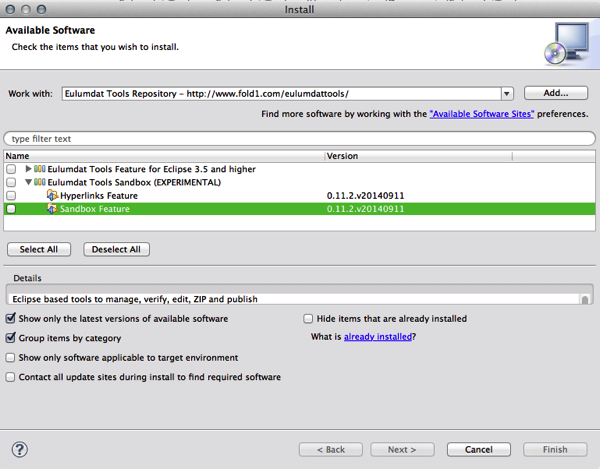
Select menu Help / Install New Software... and choose the Eulumdat Tools Sandbox / Sandbox Feature, press Next and follow through with the installation. Also see here

Wednesday, May 27, 2015

IES syntax coloring, keyword content assist in EulumdatTools 0.14.6.v20160115

A new version of EulumdatTools 0.14.6.v20160115 was published on January 15 at http://www.fold1.com/eulumdattools/.

Improvements 0.14.6

  • Improved IES syntax coloring, now also indicating periods as field separators
Replace productcode with
  • Added a QuickFix for missing item code in standard version and duplicate item code in sandbox version for EULUMDAT files. You can fill in product code from filename or product name.

Improvements 0.14.5

  • Code quality improvements

Improvements 0.14.4

Ies syntax color content assist
  • IES file keywords now have content assist, activated on CTRL+SPACE on Windows/Linux and CMD+SPACE on Mac
  • IES files now have syntax coloring, with illegal characters immediately showing up in RED!
  • Fixed issue with hard coded expiry date

Improvements 0.14.3

  • All versions of EulumdatTools are now based on Eclipse 4.5.1 Mars. To upgrade reinstall from the download site listed below. The Mac version now looks like a regular Mac application.
  • Make it possible to retain Testlab and Testdate/Issuedate on conversion of IES to EULUMDAT and vice versa.Testlab and date keep Based on a suggestion/request by Mikulas Parma.
  • Allow setting of Test Lab name when there is a full license, to be used in conversions.Testlab name pref
  • Removed some annoying behavior where latest blog post opened in external browser

Improvements 0.14.2

  • Fixed nasty conversion bug where IES to EULUMDAT conversion for IES files with absolute photometry had wrong DFF factors calculated. These can be caught and fixed by the Eulumdat validator, but now they are calculated correctly in the first place. If you have converted IES files to EULUMDAT with absolute photometry in the past and not validated the output, please reconvert your files!
  • NOTE: the same bug affected the online IES to EULUMDAT converter at http://ies2eulumdat.appspot.com, so if you have used that, reconvert also!

Improvements 0.14.1

  • A regression causing the IES validator to stop working was fixed (IES Validator Feature)

Improvements 0.14.0

  • Checking your license will now use the https: protocol instead of http: increasing your privacy
  • Open Editors will now return to opened tab between sessions
  • A problem where the cursor moved to start of line in the source editors when installed in Eclipse e4 was fixed
  • You can read this blog right in EulumdatTools so you will always be up to date on latest developments
  • EulumdatTools now contains a structured compare editor to make comparing 2 EULUMDAT files easier (see image) (Sandbox Feature)
  • A check for overlapping C-planes, where there are C-planes for both 0° and 360° was added (Sandbox Feature)

Availability

Registered users should update using Help / Check for Updates... and install the needed features following the steps below, new users should install EulumdatTools first. New users can download an apply for 30 day free evaluation license at the installation site

Installation of EulumdatTools

For use in Eclipse you can use the standard Eclipse update site For stand alone RCP versions of EulumdatTools choose your platform and perform update after installation.:

Installation of Sandbox Feature

Select menu Help / Install New Software... and choose the Eulumdat Tools Sandbox / Sandbox Feature, press Next and follow through with the installation. Also see here

Tuesday, October 28, 2014

Improved IES-EULUMDAT conversion in EulumdatTools 0.13.1.v20141027

A new version of EulumdatTools 0.13.1.v20141027 was published on October 27 at http://www.fold1.com/eulumdattools/.

IES to EULUMDAT and EULUMDAT to IES conversion was improved:

  • There was an error in conversion of files with absolute photometry, IES files signal this by having a -1 for lumens per lamp, EULUMDAT files signal this by have a negative number of lamps. The conversion now works correctly.
  • As the lighting industry is moving over to SSD lighting at tremendous speed, with resulting lower energy consumption, I found that the old rounding of wattage and power consumption are making conversion inaccurate. The number of decimal places for power consumption and wattages was increased to 2.

Availability

Registered users should install this feature following the steps below, new users should install EulumdatTools first. New users can download an apply for 30 day free evaluation license at the installation site

Installation of EulumdatTools

For use in Eclipse you can use the standard Eclipse update site For stand alone RCP versions of EulumdatTools choose your platform and perform update after installation.:

Installation of Sandbox Feature

Select menu Help / Install New Software... and choose the Eulumdat Tools Sandbox / Sandbox Feature, press Next

Install sandbox feature

Press Next

Install sandbox feature 2

Accept the license

Accept license

Accept and Trust my certificates to install this feature

Accept certificate

Monday, October 6, 2014

EULUMDAT refactoring now in EulumdatTools 0.13.0.v20141006

A new version of EulumdatTools 0.13.0.v20141006 was published on October 6 at http://www.fold1.com/eulumdattools/.

The EULUMDAT validator was improved by:

  • refactoring of EULUMDAT files, changing symmetry, orientation and mirroring

Earlier I described the feature of finding hidden symmetry in EULUMDAT files, today we talk about fixing that.

Refactoring EULUMDAT files

When photometric data files are converted between IES and EULUMDAT, or when a new laboratory is used, of for other historical reasons it happens that photometric files do not have the correct symmetry or orientation. Public lighting products usually have symmetry on the C90-C270 axis, but there appears to be inconsistency on whether C90 aims at the street or curb. Sometimes there is symmetry in the product, but the data has no symmetry defined.

When that happens, EulumdatTools can come to the rescue, in the latest release, with Sandbox Feature installed you can 'refactor' or modify the photometrics in a structured way. The available options are listed in the 'Refactor' menu, that is shown once an EULUMDAT file is open in the editor.

Final refactor menu

First step is to 'Unroll' the file, to change it from any Symmetry into a Symmetry NONE file. After that you can apply 'Rotation' for 90° clockwise or counter-clockwise or 180°, 'Mirror' over the C90-270 or C0-180 axis until you have the proper position. The final step would be to 'Reduce' the file to Symmetry on C90-270, C0-180 or both axis, or to make it rotation symmetric. After that the file can be saved again. When you do this in the source page view, all of these actions are Undoable.

Availability

Registered users should install this feature following the steps below, new users should install EulumdatTools first. New users can download an apply for 30 day free evaluation license at the installation site

Installation of EulumdatTools

For use in Eclipse you can use the standard Eclipse update site For stand alone RCP versions of EulumdatTools choose your platform and perform update after installation.:

Installation of Sandbox Feature

Select menu Help / Install New Software... and choose the Eulumdat Tools Sandbox / Sandbox Feature, press Next

Install sandbox feature

Press Next

Install sandbox feature 2

Accept the license

Accept license

Accept and Trust my certificates to install this feature

Accept certificate

Saturday, September 13, 2014

Finding duplicate Product Codes in large EULUMDAT sets

A new version of EulumdatTools 0.11.2.v20140911 was published on September 11 at http://www.fold1.com/eulumdattools/.

The EULUMDAT validator was improved by:

  • allowing easier deployment of sandbox (experimental) checkers and features.

Yesterday I described the feature of finding hidden symmetry in EULUMDAT files, today we talk about duplicate Product Codes.

Detecting duplicate Product Codes

Many files for products are created by copying an existing file and editing some of the data. Sometimes the Product Code is not edited correctly, so there are multiple files all describing the same Product Code. When using the files to enter them into a database for online or mobile lighting calculations, such as for lightingCalc confusing data may be the result. Detecting duplicate product codes is easy from now on, set as global Preference or per project Property.

Enable the Sandbox checker in the Preferences for global reach...

Set as preferences

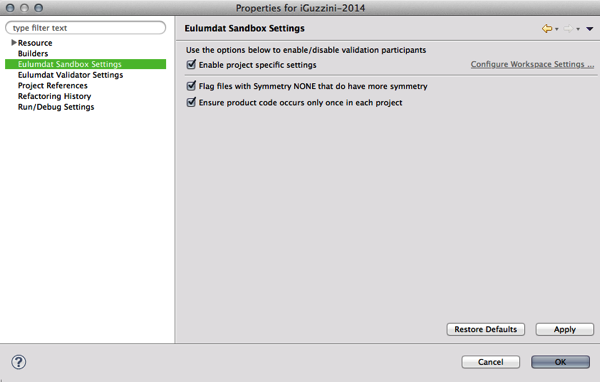
or select a project and set it in the Properties.

Set as project properties

Errors in the Problems View will show what and where duplicates are located.

Duplicate product code error

More wishes?

Contact me or comment on this blog

Availability

Registered users should install this feature following the steps below, new users should install EulumdatTools first. New users can download an apply for 30 day free evaluation license at the installation site

Installation of EulumdatTools

For use in Eclipse you can use the standard Eclipse update site For stand alone RCP versions of EulumdatTools choose your platform and perform update after installation.:

Installation of Sandbox Feature

Select menu Help / Install New Software... and choose the Eulumdat Tools Sandbox / Sandbox Feature, press Next

Install sandbox feature

Press Next

Install sandbox feature 2

Accept the license

Accept license

Accept and Trust my certificates to install this feature

Accept certificate